


Skip to Main Content

Your money, your way

The smell of freshly roasted coffee. The perfect parking spot. Finding money in your pocket. Zero everyday transaction fees on your account. Your favourite daily moments.

Banking with us could be one of yours when you open an Everyday Account. Enjoy unlimited everyday transactions, no account keeping fee and pay in an instant using mobile payments.

Plus our app makes it a breeze to manage your account and keep track of your money wherever you are in the world. Every day is different, so get the most out of it with banking you can count on:

No monthly account keeping fee.
Unlimited free everyday transactions^^.
Get access to an instant digital card via our app.
Check out faster in-store or online with mobile payments.
Access your account 24/7 using our app or internet banking.
Pay wherever Visa is accepted^.
Use our ATMs, Greater Bank and any of the big four banks for freeΔ.
Get paid directly into your account by submitting a form with your employer.
Open and operate your account securely online, guided by our security advice.
Security features to help keep your money safe from scams.

Everyday Account perks

Go fee-free

Zero everyday transaction or monthly account keeping fees.

24/7 access

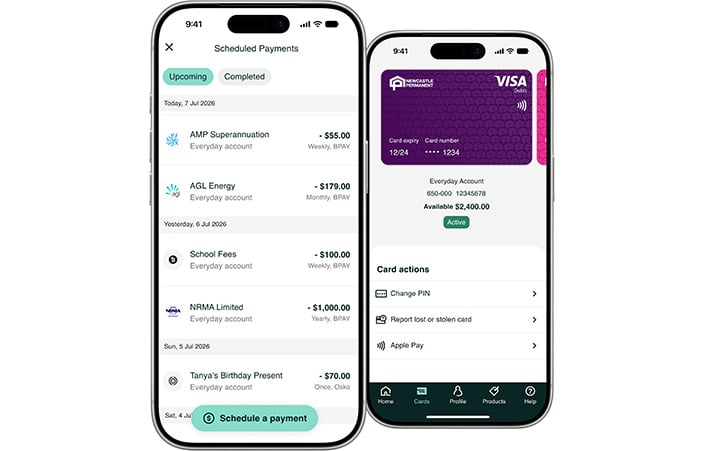
Use our app or internet banking to manage your money across any device.

More flexibility

Enjoy unlimited everyday transactions and pay wherever Visa is accepted.

Pay your way

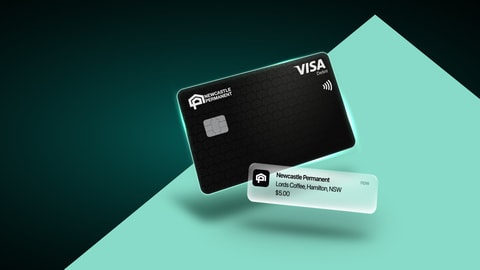
Choose a Visa Debit card colour and add straight to Digital Wallet.
Rates are effective as at 9am Saturday 06/06/2026 and are subject to change without prior notice.
Everyday account Interest rate
Entire balance 0.01% p.a.
Entire balance when linked to an eligible loan For 100% Interest Offset - equivalent linked loan's %p.a.

Fees and charges

Account keeping fee Nil
Branch withdrawal fee Nil
eftpos fee Nil
Newcastle Permanent ATM enquiry feeΔ Nil
Newcastle Permanent ATM withdrawal feeΔ Nil

Open Everyday Account Terms and Conditions

All rates are variable. For further information regarding interest and products generally, please review the applicable Terms and Conditions.


20% p.a. interest rate is payable by account holder on any overdrawn amount.


Terms, conditions, fees, charges and credit criteria apply.

Woman on phone

Smarter tech. Safer you.

Send payments with confidence.

Confirmation of Payee allows you to check and verify you’re sending money to the right person or business.

Unlock your banking features

Download our app and discover all that your account has to offer.

Instant account access - add your Visa card to Digital Wallet straight after opening a new account via the app and tap away with mobile payments.
Speedy and secure payments - register your email or mobile number with PayID® to transfer money securely in near real time.
Switch your salary - streamline your banking and get paid directly into your account by submitting a form with your employer.
Pay your way - set up regular payments for your bills and loan repayments to keep on top of your budget.

Set up and save

Get the best of both worlds with our Mortgage Offset Account.

Open an Everyday Account and link it with our Premium Plus Package Variable Home Loan to receive 100% offset interest.

Easily access your money when you need it with unlimited everyday transactions while saving on your home loan at the same time.

Enjoy every day convenience along with the following benefits:


  • You could save thousands on your home loan
  • No monthly account keeping fee
  • Pay wherever Visa is accepted
  • Unlimited free everyday transactions^^
  • Access your account 24/7 using our app or internet banking
  • Check out faster in-store or online with mobile payments
  • Use our ATMs and any of the big four banks for freeΔ.


FAQs

To see all FAQs visit our help & support page.

Everyday banking

Log on to the app and select ‘Profile’ from the bottom menu to find your 8 digit Customer ID. Otherwise select ‘Forgot Customer ID’ from internet banking and follow the prompts.

You'll need your Customer ID and a few other personal details.

App:

  • Download the app via the App Store or Play Store and follow the prompts.

Internet banking:

  • Register for internet banking via the Log on tab on our website and follow the prompts.

You’ll be paid into your nominated account once your employer has updated your details.


Along with your device, you'll need a Newcastle Permanent Visa Debit or Visa Value+ credit card. Our team can help you apply for an eligible product if you don't already have one.

Apple Pay

Apple Pay Terms of Use.
Apple, the Apple logo, Apple Pay, Apple Watch, Face ID, iPad, iPhone, iTunes, Mac, MacBook Pro, Safari, and Touch ID are trademarks of Apple Inc., registered in the U.S. and other countries and regions. *For a list of compatible Apple Pay devices, see support.apple.com/en-us/HT208531. Cashcards and Business+ Credit Cards are not eligible.

Terms, conditions, fees and charges apply.

First, download Google Wallet from the Google Play Store. Second, you can add an eligible card by snapping a picture or entering your account number manually.

If your eligible card is already set up for Google Play, you can simply add that card to Google Pay by confirming a few details.

Get Google Pay™

Google Pay Terms of Use.
Google, Google Pay, Android, Google Wallet, Google Play and the Google Play logo are trademarks of Google LLC. Cashcards and Business+ Credit Cards are not eligible.

Terms, conditions, fees and charges apply.

You must be 11 years or over to apply for a Visa Debit card (11-13 year olds require parental consent). You can opt to receive a Visa Debit card when opening an eligible new account.

If you wish to upgrade an existing account to a Visa Debit card visit one of our branches or call 13 19 87.

Access your accounts

You may need to access your accounts from overseas, so make sure you know your app or internet banking password before you go.

Please contact us before you go to set up an alternative Transaction Password to use while travelling, this will ensure you can continue to access your accounts avoiding any issues overseas accessing your Australian mobile number to receive your SMS one-time password.

Notify us of your travel plans

Let us know your travel plans via the app or internet banking banking so we can monitor your account activity overseas and provide better security for you.

To use the app to notify us of your travel plans:

  • Log on
  • Go to Profile
  • Select Overseas travel and follow the prompts.

To use internet banking to notify us of your travel plans:

  • Log on to internet banking and navigate to Services > Overseas travel,
  • Select 'Add trip'
  • Enter all countries you plan to visit including stopovers, and the dates you are travelling,
  • Use the checkboxes provided to let us know if you are planning to use your cards for ATM withdrawals, or for large purchases, 
  • Select ‘Save’.

Alternatively, you can call us on 13 19 87, or visit one of our branches to notify us. 

Bank where you're a winner.

Mozo People's Choice 2025 - Most Recommended

Winner - Most Recommended

Mozo | 2025


Bank of the Year - Customer Service

Money magazine | 2025


Get in touch

Speak to a local

Our friendly Newcastle Permanent contact centre are here to help.

Call 13 19 87

Make an enquiry

Get in touch with us online, and we'll get back to you as soon as possible.

Make an enquiry

Visit your branch

Find the Newcastle Permanent branch that's closest to you.

Find your local branch

Account terms, conditions, fees and charges apply.

^ Must be 11 years or over to apply for a Visa Debit card. 11-13 year olds require parental consent.

^^ 'Everyday transactions' consist of branch withdrawals. For more information refer to the product schedule.

Δ No transaction fees apply for a successful cash withdrawal or account balance query using your Newcastle Permanent Visa debit card at any Newcastle Permanent, Greater Bank, ANZ, NAB, Commonwealth Bank or Westpac ATM across Australia.

Apple Pay Terms of Use.
Apple, the Apple logo, Apple Pay, Apple Watch, Face ID, iPad, iPhone, iTunes, Mac, MacBook Pro, Safari, and Touch ID are trademarks of Apple Inc., registered in the U.S. and other countries and regions. *For a list of compatible Apple Pay devices, see support.apple.com/en-us/HT208531. Cashcards and Business+ Credit Cards are not eligible.

Google Pay Terms of Use.
Google, Google Pay, Android, Google Wallet, Google Play and the Google Play logo are trademarks of Google LLC. Cashcards and Business+ Credit Cards are not eligible.

PayID and PayTo are registered trademarks of NPP Australia Limited.

Find more information on the Mozo Experts Choice Awards 2025 and Mozo People's Choice Awards 2024 and 2025 awards research methodology at Mozo.

For more information on how we handle your data and how it is securely stored, read our Privacy Policy.

Terms and conditions apply for internet banking and the banking app.